¶ Framework Diagnostics Tool
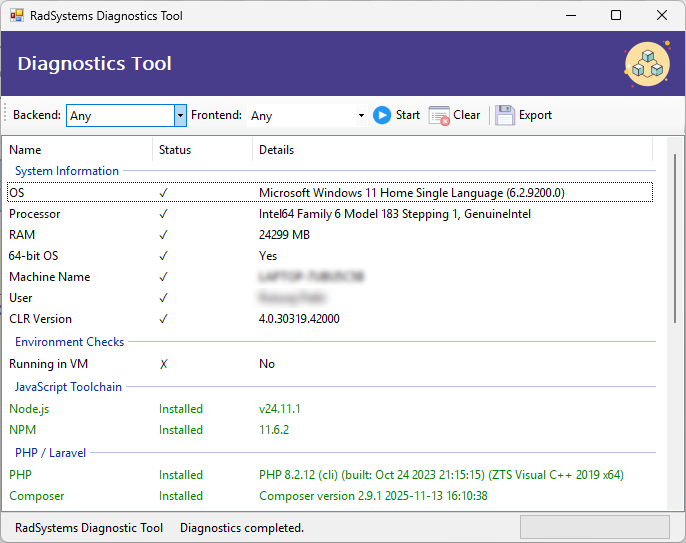
The Diagnostics Tool helps you evaluate how ready your system is for development using the frameworks supported by RadSystems Studio. It scans your environment for required tools, runtimes, and libraries, and reports whether each dependency is installed. If found, the tool displays the installed version; if not, it marks the dependency as missing.
You can run diagnostics for all supported frameworks at once or choose a specific backend and frontend combination. This allows you to verify only the toolchains relevant to your project.
The tool also reports key system specifications and environment details. After the scan completes, the results can be exported to a CSV file for reference or sharing.
Based on the diagnostic results, you can decide which tools need to be installed or updated. Installation of external frameworks and dependencies must be done manually by the user, in accordance with the respective licensing policies of those tools.
¶ Interface Controls
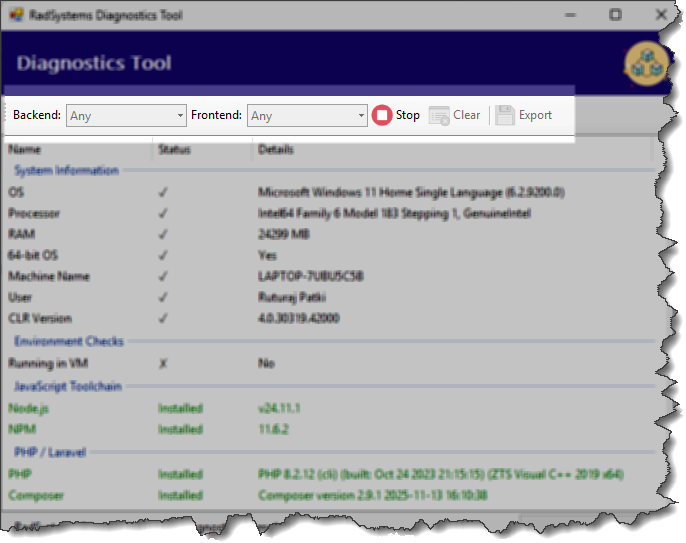
Backend / Frontend Selectors: Let you choose whether to run checks for all frameworks or for a specific stack combination.
Start: Begins the diagnostic scan.
Clear: Clears previous results from the screen.
Export: Saves the diagnostic report to a CSV file.
¶ Diagnostic Scan Check-list
When a full diagnostic scan is performed, the tool evaluates the following:
System Information
-
OS
-
Processor
-
RAM
-
64-bit OS
-
Machine Name
-
User
-
CLR Version
Environment Checks
- Running in VM
JavaScript Toolchain
-
Node.js
-
NPM
PHP / Laravel
-
PHP
-
Composer
.NET
- .NET SDK
Python / Flask
-
Python
-
Flask
Quasar UI / Build Modes
-
Quasar CLI
-
Electron
-
Cordova
Mobile (Cordova / Android)
-
Gradle
-
Java
-
Android SDK (adb)
URL Blocking
- radsystems.io: The Diagnostics Tool performs a quick connectivity check to verify whether the RadSystems Studio server is accessible from your system.