¶ User Record Management: Record Ownership Control
In multi-user applications, controlling who can access which records is just as important as controlling page access. While roles determine what parts of the system a user can open, User Record Management determines which data rows a user is allowed to see and modify.
RadSystems Studio provides a built-in, no-code mechanism for implementing record ownership rules. By linking each record in a table to a specific user, the system automatically enforces data visibility and edit restrictions at runtime. This ensures users only interact with data they are permitted to manage, while administrators can still retain full oversight when required.
Before using this feature:
-
Authentication must be enabled in the project
-
The database table must include a field that stores the User ID associated with each record (for example,
user_idorcreated_by)
¶ User Record Management Interface
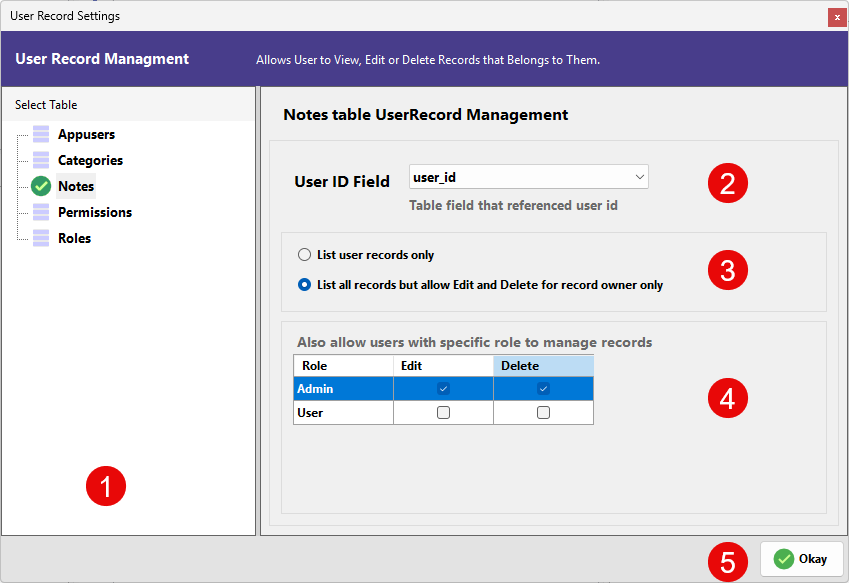
This window allows you to configure ownership and role-based overrides for a selected table. The layout consists of a table selection panel on the left and the ownership control settings on the right.
¶ 1. Select Table
The left panel displays all available tables in the project.
-
Selecting a table (such as Notes) loads its ownership configuration.
-
Each table must be configured individually.
-
The rules defined here apply only to the currently selected table
-
When the User Record Management is configured for the table, a green tick-mark appears before the name of the table.
¶ 2. User ID Field
This dropdown defines which column in the selected table represents the record owner.
-
Choose the field that stores the ID of the user who created or owns the record (e.g., user_id).
-
RadSystems compares this value with the currently logged-in user’s ID to determine ownership.
-
Once mapped, record filtering and restrictions are handled automatically.
¶ 3. Record Visibility Rules
These options determine how records are displayed and controlled for regular users.
List user records only
-
Users can see only the records they own.
-
Records belonging to other users are completely hidden.
-
Ideal for private or user-specific data such as personal submissions or tickets.
List all records but allow Edit and Delete for record owner only
-
All users can view all records in the table.
-
Only the record owner can edit or delete their own records.
-
Suitable for collaborative environments where visibility is shared but control is restricted.
¶ 4. Role-Based Management Overrides
This section allows specific roles to bypass standard ownership restrictions.
| Column | Description |
|---|---|
| Role | System-defined user role (Admin, User, etc.) |
| Edit | Allows editing of all records, regardless of ownership |
| Delete | Allows deleting of all records, regardless of ownership |
Example usage:
-
Enabling Edit and Delete for Admin gives administrators full control over all records.
-
Leaving these unchecked for User ensures standard ownership rules remain enforced.
This feature is typically used to grant supervisors or administrators elevated data management privileges.
¶ 5. Saving the Configuration
Click OK to save the User Record Management settings for the selected table.
After saving:
-
List pages automatically apply filtering rules
-
Edit and delete operations follow ownership and role overrides
-
No additional coding is required
RadSystems enforces these rules consistently across the application, ensuring secure and structured data access.