¶ Order By Fields Configuration
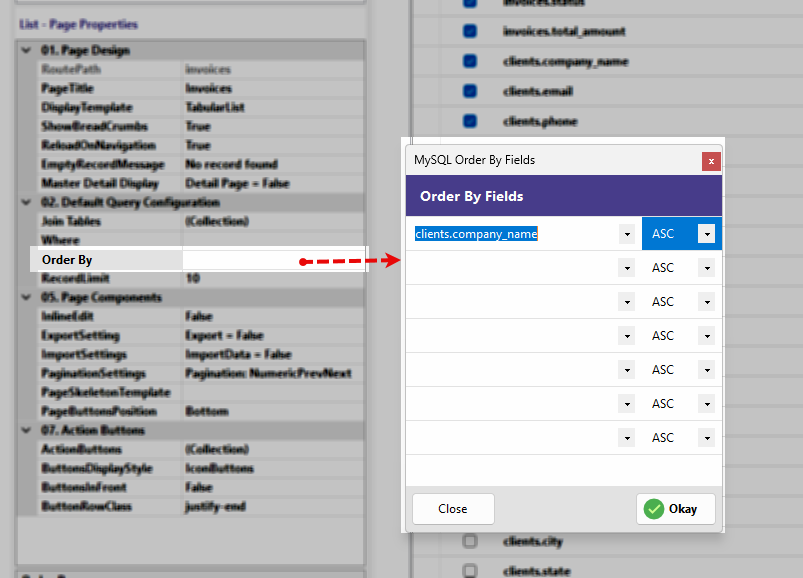
In database management, the order in which data is presented can be as important as the data itself. The Order By property allows you to define the default sorting logic for your page, ensuring that users see the most relevant records first, such as the newest invoices or alphabetically sorted client lists.
The Order By Fields dialog provides a simple, row-based interface to manage multi-level sorting for your application's SQL queries.
¶ What is "Order By"?
The ORDER BY clause in SQL is used to sort the result-set in either ascending or descending order.
-
Ascending (ASC): Sorts data from smallest to largest (A to Z, 1 to 10).
-
Descending (DESC): Sorts data from largest to smallest (Z to A, 10 to 1).
¶ When to Use It
-
Chronological Sorting: Use it on date fields (e.g.,
created_at) to show the most recent entries at the top of a list. -
Alphabetical Sorting: Use it on name fields (e.g.,
client_name) for easy navigation through long directories. -
Prioritization: Use it on numeric fields (e.g.,
total_amount) to highlight high-value records.
¶ Interface Overview
The configuration window is designed to be intuitive, allowing for multiple layers of sorting:
-
Field Selection (Left Dropdown): Each row features a dropdown menu containing all the fields available in your table. Select the field you wish to sort by.
-
Sort Direction (Right Dropdown): Next to each field, you can choose the direction:
-
ASC: For ascending order.
-
DESC: For descending order.
-
-
Multi-Level Sorting: The interface allows you to define multiple sorting rules.
- Example: You can sort by
statusfirst (ASC), and then byinvoice_date(DESC). This would group all "Active" invoices together and show the newest ones within that group at the top.
- Example: You can sort by
-
Empty Rows: Any rows left unselected are ignored by the query generator.
¶ Finalizing the Sort Order
-
Close: Exits the window without applying changes.
-
Okay: Saves your sorting preferences. RadSystems Studio will immediately update the underlying SQL query to reflect this order the next time you publish the project.