¶ Record Timestamp Management
In any professional data-driven application, tracking when information was entered or modified is vital for maintaining a reliable audit trail. Record Timestamp Management provides a chronological history of data changes, which is essential for security audits, troubleshooting, and understanding user activity patterns.
Implementing this robust tracking system in RadSystems Studio is incredibly simple and requires zero manual coding. Even if you have not included timestamp fields in your original database schema, RadSystems Studio can automatically generate the required fields for any selected table, ensuring your application is ready for high-level data auditing from day one.
¶ Records Timestamps Management Interface
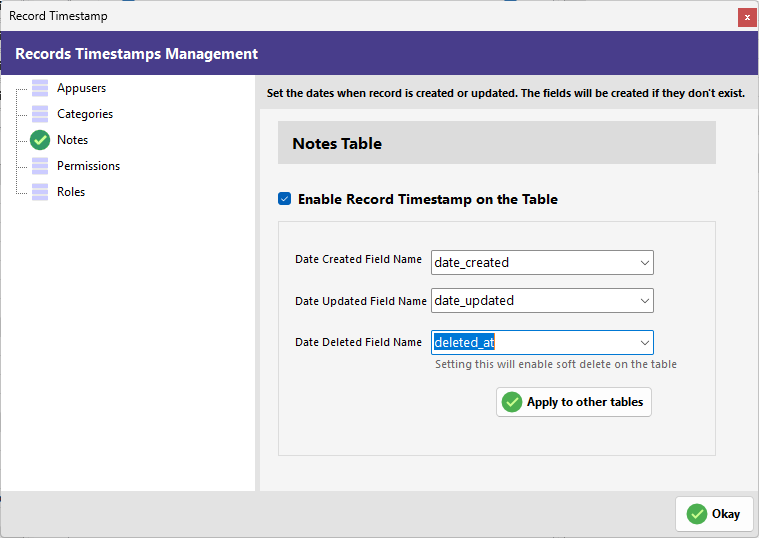
The configuration screen is designed to allow for quick setup across individual tables or your entire project database.
¶ Table Selection List
The left-hand sidebar displays a list of all tables currently in your project.
- Table Selection: Click on a specific table to manage its unique timestamp settings. A green checkmark appears next to the table once the timestamp fields are configured for that table.
¶ Timestamp Configuration Panel
Once a table is selected, the central panel provides the following controls:
-
Enable Record Timestamp on the Table: This master checkbox activates the timestamp tracking logic for the selected table. When checked, the field mapping options below become active.
-
Date Created Field Name: Use this dropdown to select the field that will automatically store the date and time a record is first created (e.g., date_created).
-
Date Updated Field Name: Use this dropdown to select the field that will automatically update every time a record is modified (e.g., date_updated).
-
Date Deleted Field Name: This dropdown maps the field used to track when a record is removed (e.g., deleted_at). Selecting a field here triggers a specific data-handling behavior known as "Soft Delete."
-
Apply to other tables: This efficient shortcut allows you to propagate the current timestamp configuration to other tables in your project, saving you from repetitive manual setup.
-
Okay: Click this button to save your configurations.
¶ Soft Delete
When you map a field in the Date Deleted Field Name dropdown, RadSystems Studio automatically enables the Soft Delete feature for that specific table.
What is Soft Delete? Unlike a standard "Hard Delete," which permanently erases a row from your database, a Soft Delete simply marks the record as deleted by populating the timestamp field. The record remains in your database for archival or recovery purposes but is automatically filtered out so it no longer appears in your application's front-end list or view pages.