¶ Master-Detail Management
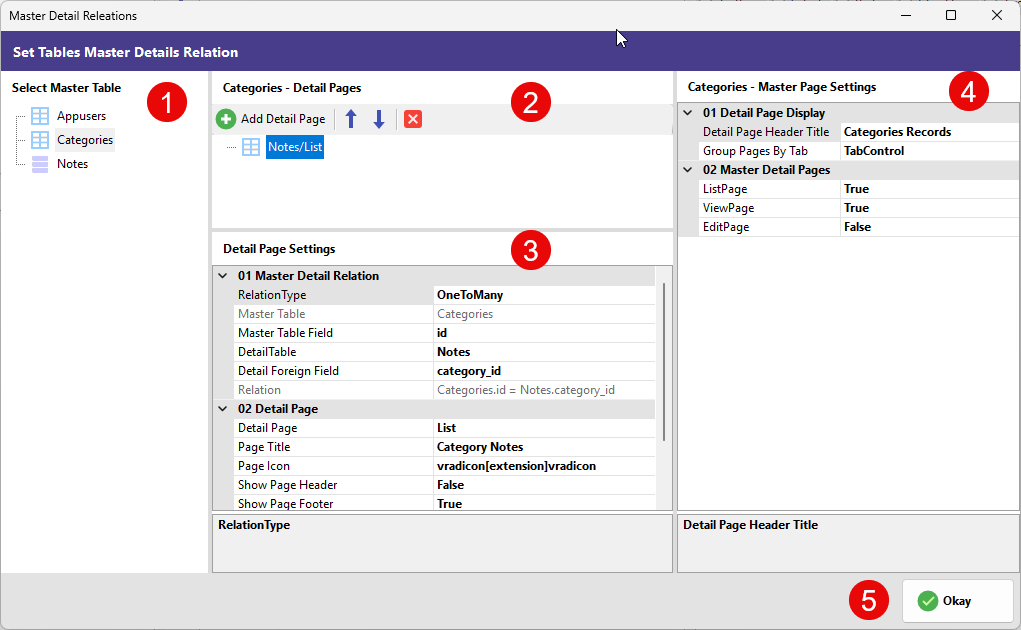
In relational database design, a Master-Detail relationship (also known as a Parent-Child relationship) is a fundamental concept where one "Master" record is linked to multiple "Detail" records. This is physically implemented using Primary Keys (PK) in the master table and Foreign Keys (FK) in the detail table. For example, a single "Category" (Master) can contain many different "Products" (Detail).
RadSystems Studio is designed to recognize these relationships intelligently. If you have already defined Foreign Key constraints within your database schema, RadSystems Studio will automatically detect them and pre-configure the Master-Detail relations for you, saving significant development time.
¶ The Master-Detail Interface
The Set Tables Master Details Relation window provides a sophisticated environment to manage how related data is displayed and interacted with in your application. The interface is organized into a logical four-column layout.
¶ 1. Select Master Table
This column lists all the tables available in your project database.
- Table Selection: Click on a table name to designate it as the Master. Once selected, you can define which other tables should act as its "children" or details.
¶ 2. Detail Pages Management
This section is where you manage the specific detail pages associated with your selected master table.
-
Add Detail Page (+): Click the green plus icon to link a new detail table to your master table.
-
Detail List: Displays the tables currently linked as details (e.g., Notes/List).
-
Reorder (Arrows): Use the up and down arrows to change the display order of the detail pages if a master has multiple children.
-
Remove (x): Click the red "x" to break the relationship and remove the detail page from this master.
¶ 3. Detail Page Settings
This area allows for granular configuration of the relationship logic and the appearance of the detail view.
01 Master Detail Relation
-
RelationType: Specifies the nature of the link, typically OneToMany.
-
Master Table / Field: Displays the parent table name and its primary key (e.g., Categories and id).
-
DetailTable / Foreign Field: Identifies the child table and the specific field acting as the foreign key (e.g., Notes and category_id).
-
Relation: Shows a summary of the join logic (e.g.,
Categories.id = Notes.category_id).
02 Detail Page
-
Detail Page: Sets the view type for the detail data, usually a List view.
-
Page Title: Define the header text users will see for this detail section (e.g., Category Notes).
-
Page Icon: Choose a visual icon to represent the detail section in the UI.
-
Show Page Header / Footer: Toggle switches to include or hide the standard header and footer elements for the detail section.
¶ 4. Master Page Settings
This column defines how the detail records are integrated into the master record's view page.
01 Detail Page Display
-
Detail Page Header Title: The main title for the collective detail section (e.g., Categories Records).
-
Group Pages By: This is a critical UI setting. You can choose TabControl to show details in clickable tabs, or Accordion to show them in a collapsible vertical stack.
02 Master Detail Pages
- ListPage / ViewPage / EditPage: Use these boolean switches (True/False) to decide exactly where the detail records should be visible. For instance, you might want to see related notes on the ViewPage but hide them on the EditPage.
¶ 5. Finalizing
- Okay: Once your relations are set, click Okay to save the configuration. RadSystems Studio will generate the necessary code to nest your detail lists within the master pages according to your specifications.