¶ Audit Trail Management
In the context of modern business web applications, an Audit Trail serves as a vital chronological record of security-relevant activities. It provides a transparent history of operations, allowing administrators to track exactly which user performed a specific action and when it occurred. This capability is essential for regulatory compliance, internal security monitoring, and investigating data discrepancies.
RadSystems Studio makes implementing this complex tracking system remarkably easy, allowing you to establish a complete audit log for your entire application without writing a single line of code.
¶ Audit Trail Configuration Interface
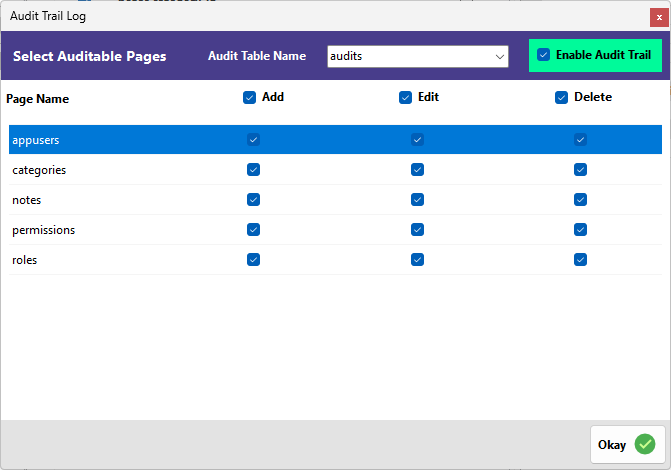
The Audit Trail Log management window allows you to define where your logs are stored and precisely which pages and actions should be tracked.
¶ Audit Table Configuration
At the top of the interface, you configure the destination for your activity logs.
-
Audit Table Name: Use this dropdown to select an existing database table to store your logs.
-
Automatic Table Creation: If you do not have a table ready, you can simply type a new name in this field (the default is audits). RadSystems Studio will automatically create the required table with the necessary schema in your database. If you prefer to build the table manually, use the default Audit Log Table schema provided at the bottom of this page as your reference.
-
Automatic Synchronization: Once the database is updated with the new table, it is automatically synchronized within your application. The newly added table will appear in your project's table list, and RadSystems Studio will automatically generate the List and View pages for it.
-
Enable Audit Trail: This master toggle must be checked to activate the logging service across your selected pages.
¶ Select Auditable Pages and Global Actions
The main section of the interface consists of a grid where you define the granularity of your logging.
-
Global Action Selectors: The Add, Edit, and Delete checkboxes at the top of the columns act as global controls. Checking or unchecking these will automatically apply that action to all tables in the list at once.
-
Page Name: This column lists all functional modules and database tables within your project, such as appusers, categories, or notes.
-
Selective Logging: While the global selectors provide speed, you can selectively decide which actions to log for a specific table. You may manually check or uncheck the Add, Edit, or Delete boxes for an individual table to skip specific actions while logging others.
¶ Finalizing the Setup
- Okay: Click this button to save your configurations and initiate the background processes that will monitor and log your application's data activity.
¶ The Generated Audit Log
Once published, your application will maintain a detailed log containing the user identity, the type of action performed, the specific page affected, the unique record ID, and a precise timestamp of the event.
¶ Audit Log Table Structure
The audits table stores all tracked system activities, including data changes, user actions, and contextual request information. Each record represents a single audited event.
| Field | Type | Purpose |
|---|---|---|
| id | BigInt (Unsigned) | Unique identifier for each audit record. |
| user_type | Varchar(255) | Identifies the type or model of the user who performed the action (useful in multi-user-type systems). |
| user_id | BigInt (Unsigned) | The ID of the user responsible for the action. |
| event | Varchar(255) | The type of action performed (e.g., created, updated, deleted). |
| auditable_type | Varchar(255) | The name of the entity or table where the action occurred. |
| auditable_id | BigInt (Unsigned) | The ID of the specific record that was affected. |
| old_values | Text | Stores the previous data before the change (for update operations). |
| new_values | Text | Stores the new data after the change. |
| url | Text | The URL or endpoint from which the action was triggered. |
| ip_address | Varchar(45) | The IP address of the user making the request. |
| user_agent | Varchar(1023) | Browser or client device information of the user. |
| tags | Varchar(255) | Optional labels used for categorizing or filtering audit records. |
| created_at | Timestamp | The date and time when the audit entry was created. |
| updated_at | Timestamp | The last time the audit record itself was modified. |
This structure enables full traceability of system changes, supports compliance requirements, and helps with debugging and activity monitoring.
¶ Default Audit Log Table Schema
CREATE TABLE `audits`  (
  `id` bigint UNSIGNED NOT NULL AUTO_INCREMENT,
  `user_type` varchar(255) CHARACTER SET utf8mb4 COLLATE utf8mb4_unicode_ci NULL DEFAULT NULL,
  `user_id` bigint UNSIGNED NULL DEFAULT NULL,
  `event` varchar(255) CHARACTER SET utf8mb4 COLLATE utf8mb4_unicode_ci NOT NULL,
  `auditable_type` varchar(255) CHARACTER SET utf8mb4 COLLATE utf8mb4_unicode_ci NOT NULL,
  `auditable_id` bigint UNSIGNED NOT NULL,
  `old_values` text CHARACTER SET utf8mb4 COLLATE utf8mb4_unicode_ci NULL,
  `new_values` text CHARACTER SET utf8mb4 COLLATE utf8mb4_unicode_ci NULL,
  `url` text CHARACTER SET utf8mb4 COLLATE utf8mb4_unicode_ci NULL,
  `ip_address` varchar(45) CHARACTER SET utf8mb4 COLLATE utf8mb4_unicode_ci NULL DEFAULT NULL,
  `user_agent` varchar(1023) CHARACTER SET utf8mb4 COLLATE utf8mb4_unicode_ci NULL DEFAULT NULL,
  `tags` varchar(255) CHARACTER SET utf8mb4 COLLATE utf8mb4_unicode_ci NULL DEFAULT NULL,
  `created_at` timestamp NULL DEFAULT NULL,
  `updated_at` timestamp NULL DEFAULT NULL,
  PRIMARY KEY (`id`) USING BTREE,
  INDEX `audits_auditable_type_auditable_id_index`(`auditable_type` ASC, `auditable_id` ASC) USING BTREE,
  INDEX `audits_user_id_user_type_index`(`user_id` ASC, `user_type` ASC) USING BTREE
) ENGINE = InnoDB AUTO_INCREMENT = 1 CHARACTER SET = utf8mb4 COLLATE = utf8mb4_unicode_ci ROW_FORMAT = Dynamic;